Project management for small architecture practices
Flori is project management software for architects at practices of 1 to 20 people: enquiries, stage tasks, consultants and client sign-offs on one record. Most practices also need fee management, which tracks each job’s fee by stage and bills by percentage complete; Monograph, BQE CORE and Deltek Ajera are built for that. Flori has no fee-stage billing and no drawing management.
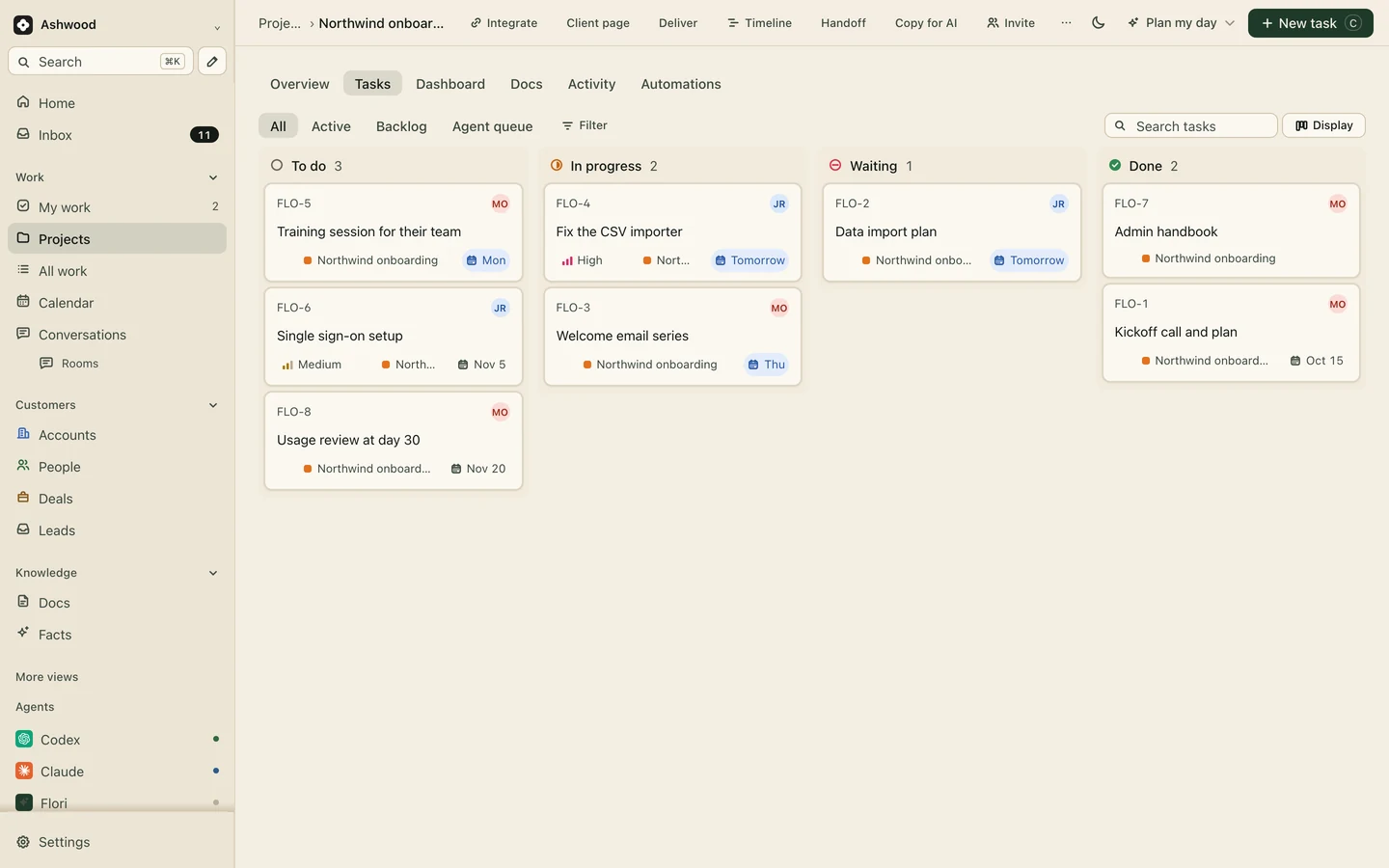
Fig. 1 · DemoOne job, every stage as tasks with owners and dates
Where a small practice loses time on a job
Most jobs stall at the end of a stage, waiting for someone outside the studio.
Client decisions with no date on them
Concept options go out on Tuesday. Nobody records when the client said yes, so Spatial Coordination starts on a sign-off that only exists in an email thread.
Consultants who go quiet
The structural engineer owes information for the planning submission. The chase happens on Thursday because nobody saw on Monday that it was late.
Enquiries that never become fee proposals
A homeowner rings about an extension. The call notes sit in a notebook, the fee proposal goes out a week late, and the job goes to the practice that answered first.
Every stage of the job is a task, with its dependencies
Start each won job from a project template with one task per stage and subtasks under it: survey, options, client presentation, pre-application advice, planning drawings. A dependency stops the planning application task from starting before concept sign-off.
RIBA stages or AIA phases, as you name them
Time logged against each stage’s tasks, so you can see where concept ran over
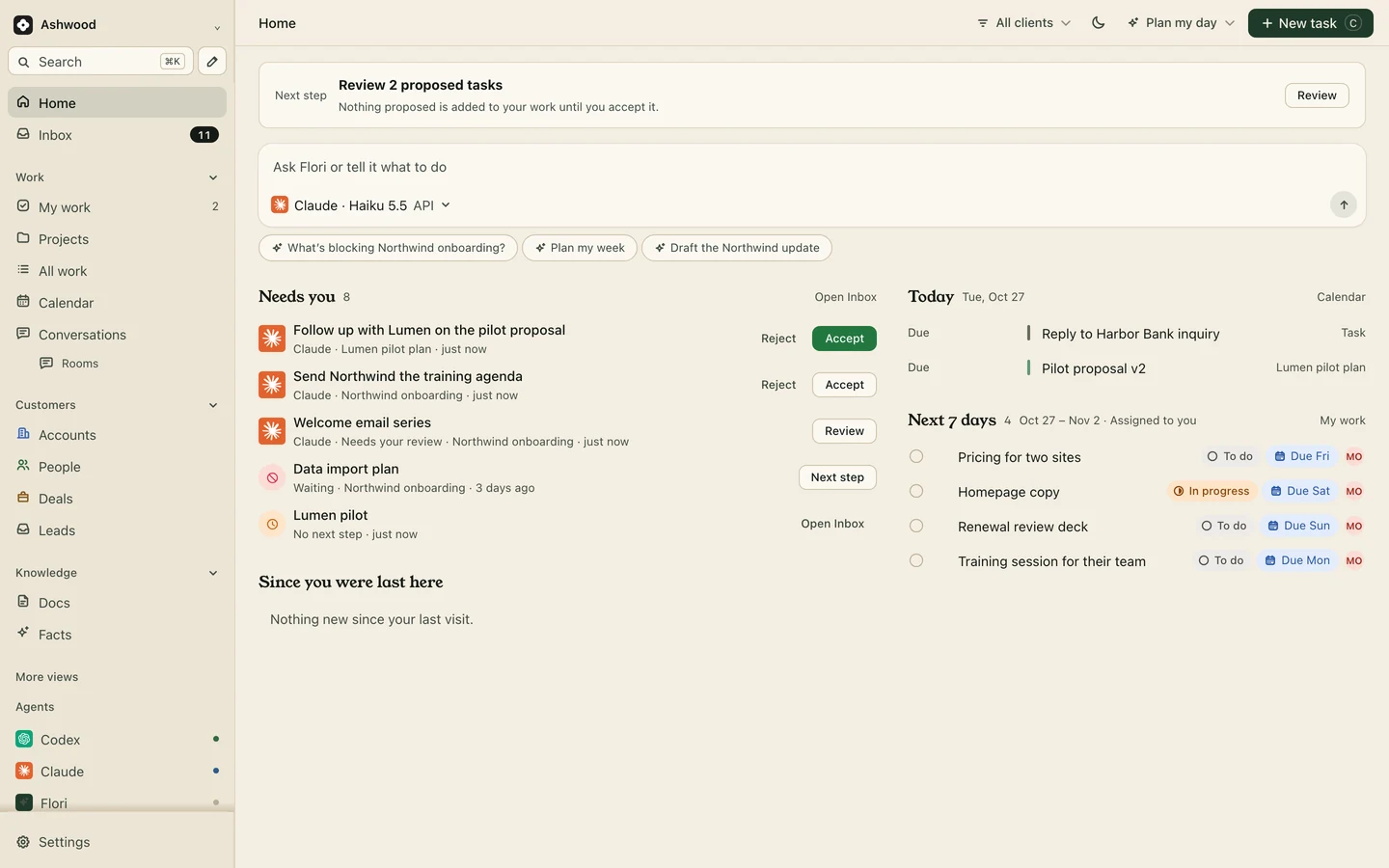
Monday’s view: what is due, and what is waiting on someone else.
Consultants and the information you are waiting for
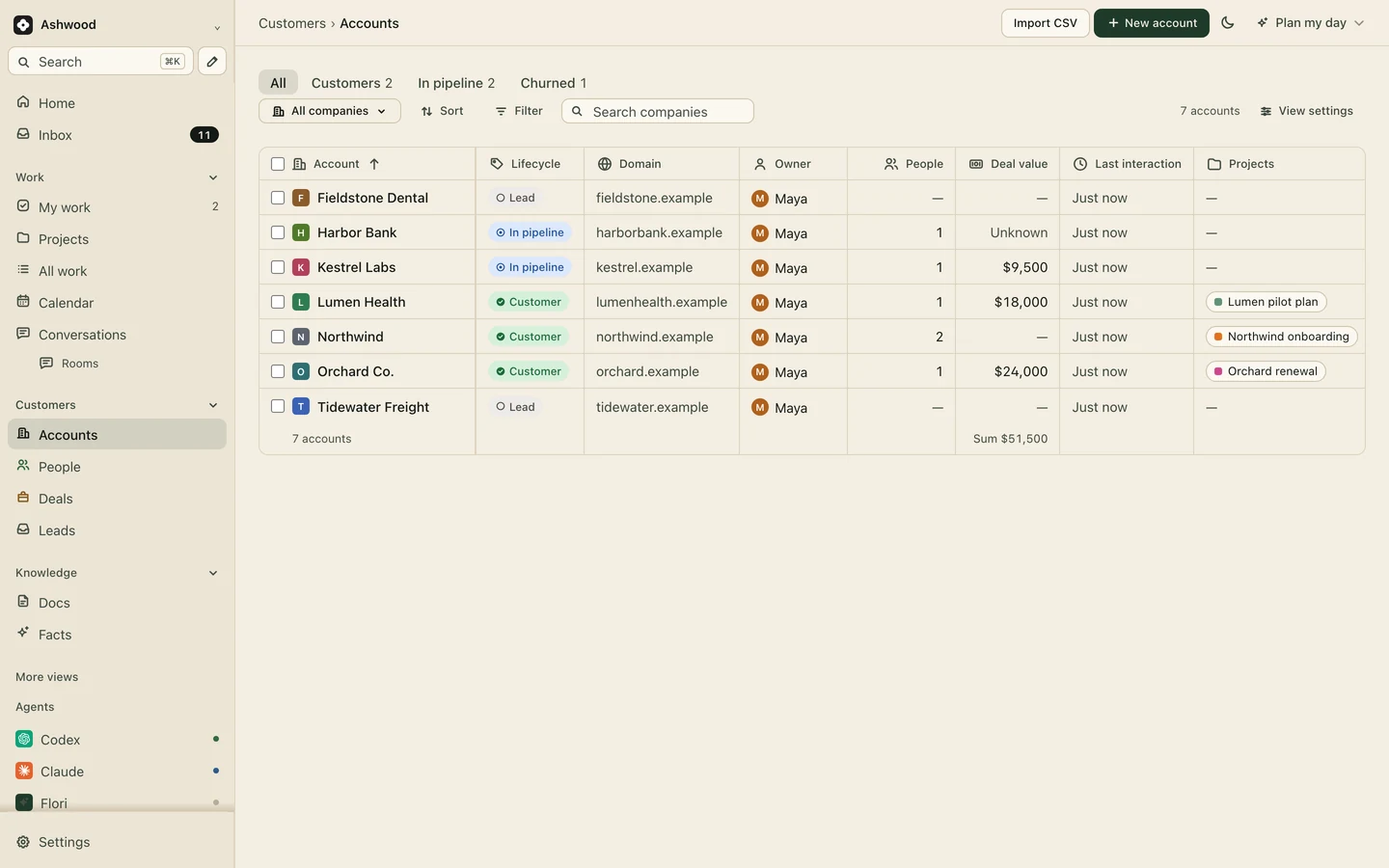
Record each consultant firm as an account with its people. Tasks waiting on the structural or services engineer are marked Waiting and linked to them, so overdue information shows up in the weekly review instead of in a chase email on Thursday.
Clients and consultants as accounts, each with the projects they are on.
Enquiries become fee proposals with a next step
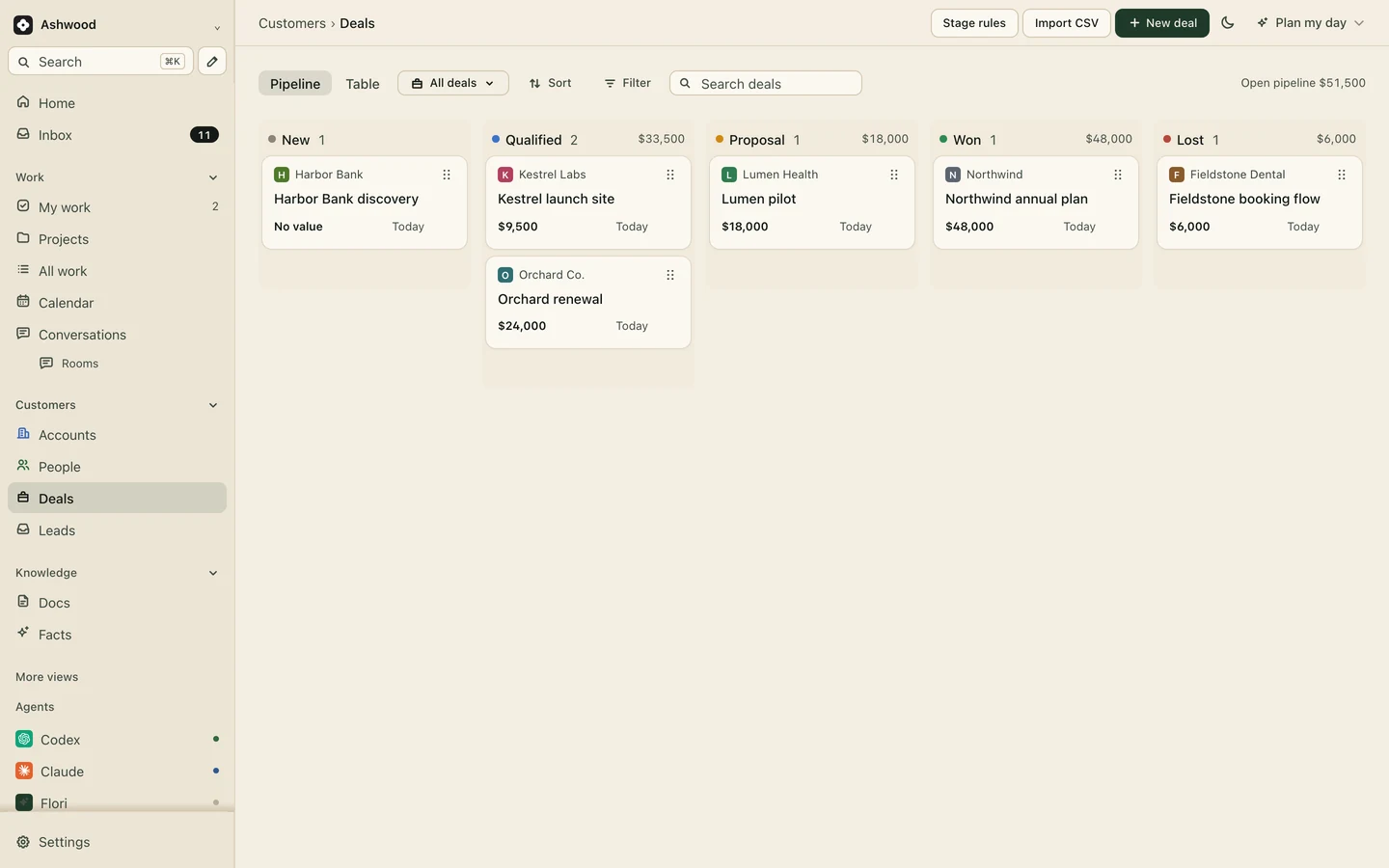
Enquiries arrive as leads, from a website form on Core or by hand. Qualify one into an account for the client and a deal for the fee proposal, with its value and a dated next step. When the appointment is signed, the deal is won and the job starts from your template.
Forms: Core and up
Fee proposals in a pipeline, so none waits a week for a reply.
One stage, from options to sign-off
Fictional example: a four-person residential practice at Concept Design.
Monday
The weekly review shows the concept options due Wednesday and one task Waiting on the client’s survey.
Tuesday
The options are published to the client page on Core, with the stage report your assistant drafted from site visit notes and you checked.
Thursday
The client approves from the link. The approval stays on the job, with the date.
Friday
Spatial Coordination starts. The structural engineer’s information task is dated and marked Waiting on their firm.
How does an architecture project run through its stages?
Most UK practices work to the eight stages of the RIBA Plan of Work 2020, and most US practices to AIA-style phases such as schematic design, design development, construction documents and construction administration, the phases Monograph names in its own guides. The mapping is approximate; your appointment defines the real scope.
RIBA stage
Closest US phase
Typical work
What to track
0 Strategic Definition, 1 Preparation and Briefing
Pre-design
Brief, site information, appointment and fee proposal
Enquiry, fee proposal, signed appointment
2 Concept Design
Schematic design
Options, client sign-off, pre-application advice
Client decisions, sign-off date
3 Spatial Coordination
Design development
Coordinated design with structural and services consultants, planning application
Consultant information due, planning submission date
4 Technical Design
Construction documents
Drawings and specification for building regulations and tender
Drawings register, specification, building control
5 Manufacturing and Construction
Construction administration
Site visits, RFIs, instructions, valuations
RFIs open and answered, site visit notes
6 Handover, 7 Use
Closeout
Snagging, as-built information, post-occupancy
Snagging list, final account
Every stage ends with something the client or a consultant must provide or approve. That is where jobs stall, and it is the part of the work a general project tool handles well.
What does tracking fees by stage look like?
Fictional example: a house extension with a $60,000 fixed fee, split by stage, at a blended internal rate of $100 an hour.
Stage
Share of fee
Fee
Hours the fee covers
Hours used
Concept Design
15%
$9,000
90
104, over by 14
Spatial Coordination
20%
$12,000
120
96, on track
Technical Design
35%
$21,000
210
Not started
Manufacturing and Construction
25%
$15,000
150
Not started
Handover
5%
$3,000
30
Not started
Two concept rounds beyond the one in the appointment cost 14 hours that nobody invoiced. A fee management tool shows this as it happens and turns the stage percentage into an invoice. In Flori you can log time against each stage’s tasks and see the hours, but the fee, the percentages and the invoice stay in a spreadsheet and your accounting software. If that is the report you need every week, Flori is not the tool.
When should a practice choose Monograph or similar instead?
Choose fee management software when the fee is the problem. Monograph says you can plan and track work by phase, manage phase budgets and billing, and separate consultant fees; its invoicing page supports percent-complete billing, and its pricing page shows a calculator from $45 to $490 a month. BQE CORE lists phased billing and reporting by phase, with per-user pricing quoted to your firm. Deltek Ajera describes itself as built for small architecture and engineering firms, priced by demo request.
A practice can use both: fee management for the money, and Flori for enquiries, consultants and client sign-offs. As of November 2026, from each vendor’s own pages.
Most practices start on Core
Core adds unlimited projects, client pages for stage sign-offs and website forms for enquiries. Clients, guests and connected assistants are never seats. Keep fees, percentages and invoices in your accounting software or a fee management tool.
Fee-stage budgets, percentage-complete billing or invoices from logged time
Drawing management, revision control, transmittals or CAD and BIM integration
Formal RFI, submittal or change-order registers
Resource planning across a large studio
E-signatures for appointments, sending invoices or taking payment
Questions
What is the best project management software for a small architecture firm?
If you bill by stage and need fee tracking, start with an architecture-specific tool such as Monograph, BQE CORE or Deltek Ajera. If your problem is enquiries, client decisions and consultants, a CRM with projects such as Flori is lighter, with billing kept in your accounting software.
Can Flori track RIBA or AIA stages?
Yes, as tasks. A project template can hold one task per stage with subtasks and dependencies, and time can be logged against each. Flori does not attach fees or percentages to stages and does not bill from them.
How do architects manage consultants on a project?
Record each consultant firm and its people, list the information you need from them by stage with due dates, and track what you are waiting for in one place. In Flori those tasks are marked Waiting and linked to the consultant.
Does Flori manage drawings?
No. Flori does not store drawing versions, issue transmittals or connect to CAD or BIM software. A sheet linked to the project can list drawing numbers and current revisions, while the files stay in your document system. The project handover template covers the closeout packet.
Do architects need a CRM?
A small one. Most practices win work from referrals and repeat clients, so the useful part is enquiries, fee proposals and past clients on the same record as the jobs they became. Flori keeps those as accounts and deals, and a won proposal can start the job from a stage template. A practice that only needs fee tracking may get enough from its fee management tool.